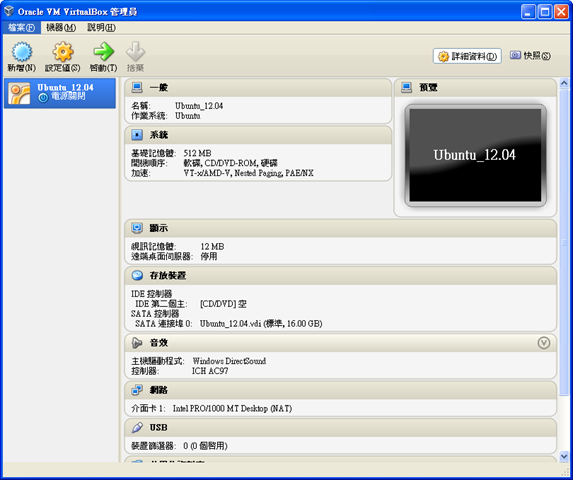
VirtualBox的好處就是讓你可以盡情的在上面安裝各式各樣的虛擬機器。繼上一篇文章『在Win XP 上面安裝VirtualBox 4.2』中提到如何安裝VirtualBox,接著記錄的是Ubuntu的安裝過程。 安裝虛擬機器 Ubuntu 12.04
在VirtualBox 的安裝虛擬機器算是簡單的動作。首先要在VirtualBox根據客體作業系統做適當的配置,然後下載客體作業系統的安裝檔案(通常是ISO映象檔),根據客體作業系統的原生方式安裝。
dragonspring 發表在 痞客邦 留言(1) 人氣(12,928)

(via CC license from http://www.flickr.com/photos/valeriebb/3006348550/) 在 Win XP SP3 安裝VirtualBox 4.2時我所遇到的問題,集中整理於此篇文章。VirtualbBox 的安裝記錄請參考之前的文章:
dragonspring 發表在 痞客邦 留言(0) 人氣(56,428)

VirtualBox是什麼
dragonspring 發表在 痞客邦 留言(0) 人氣(5,907)

CHM是什麼
CHM 是微軟專用的說明檔格式:Microsoft Compiled HTML Help,基本上是把HTML 檔案經過『編譯』的動作,整合成一個檔案。.CHM檔案廣泛使用於Windows 作業系統上的應用程式,做為說明檔。也因為單一檔案的特性,做為許多電子書採用的檔案類型。
dragonspring 發表在 痞客邦 留言(0) 人氣(12,492)

有一次我的電腦一直跳出訊息說C碟空間即將用完,請清除檔案。但是無論我怎麼清,過了一會兒又再跳出同樣的訊息。這樣的步驟重複了幾次之後,我才驚覺不對勁,開始一個一個process察看,一直到關掉某個vlc process 之後,這個鬼打牆似的動作才停下來。 為什麼vlc會成為吃硬碟的怪獸呢? 原來vlc有個 bug report 的機制,如果vlc發生不預期的錯誤而導致vlc當掉的話,vlc就會產生一個bug report,這個檔案的名稱叫做 crashdump,存放在%appdata%\vlc。下一次當你重新啟動vlc的時候,vlc就會跳出以下的視窗,問你是不是要把上一次的bug report 回傳給vlc的開發人員分析。如果你按下『是』的話,這個檔案就會經由FTP上傳到vlc的開發中心。
dragonspring 發表在 痞客邦 留言(0) 人氣(2,048)

這個標題聽起來有點像在繞口令,其實是為了解決一個實際上碰到的問題:
在Windows XP 中,您可能在移除硬體裝置的時候遭遇到以下的錯誤訊息:
無法解除安裝裝置。裝置可能是開機必需的裝置。
dragonspring 發表在 痞客邦 留言(0) 人氣(4,317)
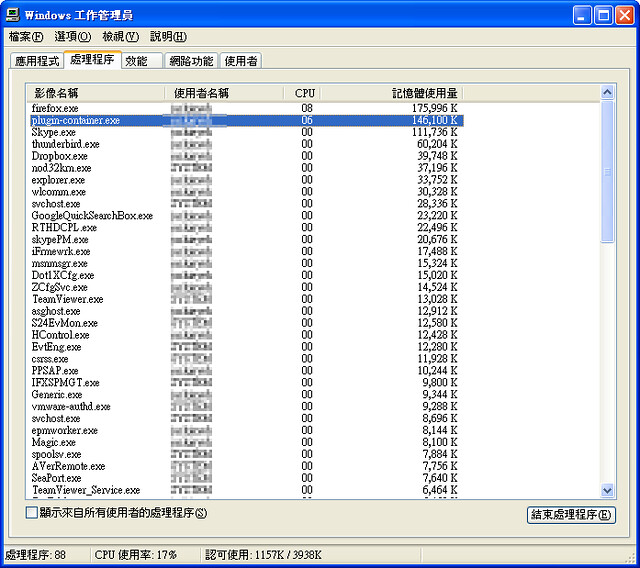
如果你也跟我一樣在使用Firefox 3.6,發現工作管理員有時候會出現一個佔用CPU或記憶體的程序:plugin-container.exe,以下是我爬所發現的解決之道。 plugin-container.exe 這個程序本來的目的是將外掛(plugin)獨立處理,以免因為外掛的不穩定,而造成firefox當機。不過實際的狀況是:plugin-container.exe 佔用了太多記憶體,甚至可能拖垮系統執行效能。這樣的情況在開啟Flash時特別明顯。
dragonspring 發表在 痞客邦 留言(0) 人氣(26,517)
在某些很特殊的情況下,需要利用DOS BATCH檔來呼叫 Firefox,在這邊做個筆記。命令列參數如下:
| Command | Result | Example |
| profile "<path>" | Starts with profile located at the given path.
Does not apply to Mozilla Suite/SeaMonkey 1.x | firefox.exe -profile "E:\myprofile" |
| P "<profile name>" | Starts with a given profile name (profile name is case sensitive). | firefox.exe -P "Joel User" |
| <url> | Launches the application and opens the given URL(s). | firefox.exe "www.mozilla.org" "www.mozillazine.org" |
| safe-mode | Launches the application with extensions disabled and the default theme.
Does not apply to Mozilla Suite/SeaMonkey 1.x | firefox.exe -safe-mode |
| no-remote | Enables running multiple instances of the application with different profiles; [1] used with -P
Does not apply to Mozilla Suite/SeaMonkey 1.x | firefox.exe -no-remote |
| height <value> | Sets height of the startup window to <value>. | firefox.exe -height 600 |
| width <value> | Sets width of the startup window to <value>. | firefox.exe -width 800 |
| ProfileManager | Starts with Profile Manager. | firefox.exe -ProfileManager |
| CreateProfile | Create a new profile | firefox -CreateProfile test |
| migration | Starts the application with the Import Wizard
Does not apply to Mozilla Suite/SeaMonkey 1.x | firefox -migration |
| console | Starts the application with a debugging console. | firefox.exe -console |
| jsconsole | Starts with the Error Console (Javascript Console). | firefox.exe -jsconsole |
| inspector <url> | Starts with the DOM Inspector. | firefox.exe -inspector http://www.google.com/ |
| chrome <url> | Loads the specified chrome. | firefox.exe -chrome chrome://inspector/content/inspector.xul |
| new-window <url> | Loads a URL in a new browser window. | firefox.exe -new-window <url> |
| new-tab <url> | Loads a URL in a new tab. | firefox.exe -new-tab <url> |
| install-global-extension "<path>" | Installs an extension globally. | firefox.exe -install-global-extension "C:\Temp\extension-file.xpi" |
dragonspring 發表在 痞客邦 留言(0) 人氣(2,386)

用skype傳訊息時,除了內建的表情符號,還有以下這些隱藏版:
dragonspring 發表在 痞客邦 留言(0) 人氣(156,717)

在使用Windows的過程中,無可避免會遇到process 沒有反應。大部分情況下,你可以叫出工作管理員,然後將沒有回應的process殺掉。 BUT! 套句九把刀說的話:『
人生最厲害就是這個 BUT!』 有時候,連『CTRL+ALT+DEL』都沒有作用,根本沒機會打開工作管理員。
dragonspring 發表在 痞客邦 留言(0) 人氣(1,288)